
Download steuer App APK – tax solution, finance tool, Android software, secure tax app, desktop application
Overview
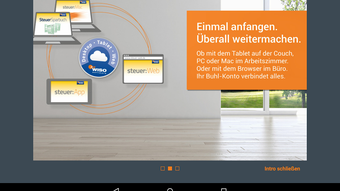
steuer:App is a mobile financial tool designed to support users in managing their tax returns on Android devices. Developed by Buhl Data Service GmbH, the app offers a convenient way to access and update tax data from any location, at any time. It functions both as a standalone solution and as a complementary tool for users of WISO tax software. The application enables users to enter, review, and modify tax information directly from their smartphones or tablets, ensuring continuous progress on tax filings without being tied to a desktop environment.
Target users include individuals preparing personal tax returns, tax professionals, and anyone seeking flexibility in handling financial documentation. The app is particularly useful for users who frequently travel or work remotely, as it allows uninterrupted access to their tax data across multiple devices. Whether in an office, at home, or during a commute, users can maintain control over their tax processes with ease. The app supports both German and English, broadening its accessibility to a wider audience.
The developer did not provide additional system requirements. The app is available for free download on Google Play, with an in-app purchase option to manage up to five tax returns. Data synchronization is managed through a personal account, ensuring consistency across devices. Security is prioritized through encryption technologies, protecting user data, passwords, and account information.
Key Features & Capabilities
- Multi-Device Access: Synchronize tax data between desktop software, web browser, and Android devices via a personal account.
- On-the-Go Tax Management: Enter, check, and update tax information anytime, anywhere, without relying on a PC.
- Integration with WISO Software: Seamlessly connect with WISO tax software for users who prefer a desktop-first workflow.
- Support for Multiple Tax Returns: Use the app independently with an in-app purchase to manage up to five tax returns.
- Language Flexibility: Available in both German and English, catering to a diverse user base.
- Data Security: Utilizes modern encryption technologies to protect sensitive financial information.
These features allow users to maintain consistent progress on their tax filings, regardless of location or device. For example, a user can start entering data on a tablet during a train ride and continue on a desktop at home, with all changes automatically synchronized. Professionals can review client data remotely, ensuring timely submissions. The in-app purchase model offers scalability for users with multiple returns, while the free base version provides essential access for individual use.
User Interface, Workflow & Performance
The user interface of steuer:App is designed for simplicity and efficiency, focusing on intuitive navigation and clear data presentation. Users can access their tax data through a structured dashboard that organizes information by tax year, return status, and data categories. Navigation is streamlined, allowing quick transitions between input fields, review sections, and settings.
Workflow efficiency is enhanced by the app’s ability to maintain real-time synchronization with the user’s personal account. This ensures that any changes made on one device are immediately reflected on others, reducing the risk of outdated or conflicting data. The app supports offline data entry, enabling users to work without an internet connection and sync changes when connectivity is restored.
Performance observations are based on general software behavior patterns. The developer did not specify resource usage details. Stability is expected to be consistent with typical Android applications of similar scope. CPU and RAM behavior are not documented, but the app’s 42.5 MB file size suggests a lightweight footprint. Users may experience smooth operation on modern Android devices, though performance may vary depending on device hardware and system conditions.
Compatibility & System Requirements
steuer:App is designed for Android devices and is available through the Google Play Store. The latest version is 2.0.2, released on 2024-05-07. The installation size is 42.5 MB, indicating a compact footprint suitable for most mobile devices.
Platform compatibility information is limited. The developer did not specify the minimum Android version required or other hardware requirements. Users are advised to ensure their device meets general Android standards for app functionality. Exact system requirements were not listed. Compatibility with older Android versions or low-end devices cannot be confirmed based on available information.
Pros and Cons
Pros
- Free to download with optional in-app purchases for expanded functionality.
- Enables access to tax data from any device with an internet connection.
- Supports seamless synchronization between desktop, web, and mobile platforms.
- Offers multilingual support in German and English.
- Provides secure data handling with modern encryption.
- Allows offline data entry and automatic sync when reconnected.
Cons
- Exact system requirements and compatibility details were not provided.
- Performance and resource usage data are not specified.
- Full functionality requires an in-app purchase for multiple tax returns.
- Limited information on long-term stability or update frequency.
- Dependent on internet connectivity for full synchronization.
FAQ Section
Is steuer:App compatible with all Android devices?
Compatibility information was partially provided. The app is available for Android devices via Google Play, but the developer did not specify the minimum Android version or hardware requirements. Users should ensure their device meets general Android standards for app functionality.
Is the app secure for handling sensitive tax data?
Yes, the app uses modern encryption technologies to protect user data, passwords, and account information. All data is stored securely through a personal account with encrypted connections.
Can I use steuer:App without a WISO tax software license?
Yes, the app can be used independently. While it integrates with WISO software, users can also utilize it as a standalone tool with an in-app purchase to manage up to five tax returns.
How often are updates released for steuer:App?
The latest version, 2.0.2, was released on 2024-05-07. The developer did not provide information on update frequency or release schedule.
Does the app require an internet connection to function?
Basic functionality, including offline data entry, is available without an internet connection. However, full synchronization across devices requires an active internet connection to upload and download data from the personal account.
Final Thoughts + CTA
steuer:App delivers a practical and flexible solution for individuals and professionals managing tax returns on the go. Its ability to synchronize data across devices, combined with secure handling of sensitive information, makes it a valuable tool in modern tax preparation workflows. The free base version offers solid functionality, while the in-app purchase option provides scalability for users with multiple returns. Although system requirements and performance metrics are not detailed, the app’s lightweight design and intuitive interface suggest broad usability.
Users who value mobility, data consistency, and security will benefit most from this application. Whether used alongside WISO software or independently, steuer:App enhances convenience without compromising reliability.
Download steuer App APK now







